SCAD+ HARBOR Week 8
Glints, comping fixes and lighwrap enhancement.
HARBOR
3/2/20253 min read
Update 5
Iterations and ideas
I have never done a glints for a diamond before or use that node, so this was a challenge I implemented this week, so that I could embrace that diamond and enhance all of the elements that the ring needs, and what is usually asked by a client professionally. We are also rendering at 2K which makes nuke a little bit slower when previsualizing, so I render some of my tests to look at them closely, most of them have to much glints and I tested only inside the diamonds with a mask or outside without the mask. It was really interesting to play with this node and keep refining it until it looked photorealsitic. I am open to feedback and waiting to see what the mentors will think of the final result but here are some of the first test I render on the glints tests.


Update 4
Details
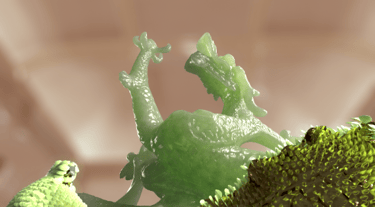
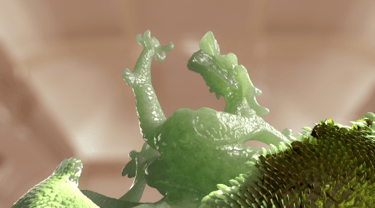
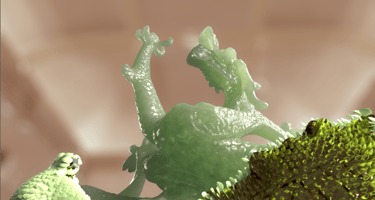
For shot 1 I worked on getting the scales less saturated because they looked like they had to much saturation on the texture exchange I did my best to match them and make them better, with the help of Mia, as look development, it was essential to have her opinnnion.
I also worked on lifting the gold up and solving the black level problems, we are still struggluing with he shadows on the particles at the end of the simulation but it is coming much better, I also embraced some of the particles that where getting the lights, and bringing those colors up as the mentors suggested. I feel like all of the shots are coming. For this shot I used a lot of crypto matte maps and it gave me all of the control I needed specially for the scales and the particles division, having cryptomattes that are varied allowed me to enhance this dragon even more.
This week the background for the 2.5 D projection was also overexposed, and since we added a couple of frames to the shot I had to re color corrected and so it is a little bit more pinkish and has less details as the one before. I already discussed it with the person incharged so we can fix it for next week, or see if the mentors like this color better and keep it.
Jade saturation test
Update 3
Details
As I mentioned before, my team worked on lighting and matte painting for shot two this week. In composition, I focused on reorganizing my Nuke script, on order to be more efficient and to have all of the clarity everyone needs to understand my script in my team. I made multiple backdrops and made my scripts as readable as possible. I also color corrected again to ensure that all elements were working cohisively for what was needed. And I added some elements that enhance that compositing elements, and that can embrace the details on what is seen from our comp. One of those examples that I applied all this week in all of the shots was light wrap so all of the pixels from the CGI could be seamlessly merged to the matte paintings provided by the team.
Update 2
Team work session
As usual on thrusday we had a meeting with the team, during this meeting we set up our goals as a team and worked on some issues we where having, such as the lighting and look development for shot 2. As a team we worked on getting this shot to the next level by enhancing the lighting to give more depth to the partciles and also enhance the suggestions form the entors since this is our hero shot. Working a long as a team has ups and downs but we have worked through them and we are working so much better as a team with all of the communication skills we have develped over the last 8 weeks. This work session also allowed us to prioritize feedback and learn all of the things we needed to do as a team to figure things out.
Update 1
Notes from the mentors to enhance this week
Shot 1-2
pscale vary more - more varied particles small/med/large
Key to fill light is good
Make the particles a shinnier in comp
Fix black levels that are really dark (this was because of the render issues)
Don't lose te range of lighting in the particles
Shot 2-2
Consider slowing the particles
Get a range of lighting
Add more shape lighting to the particles
Ease into the ring drop
Motion is awesome, range feels flat
Try a large area light to the side of the tree
Particles feel flat, motion blur feels a bit crazy
flickering on the ring
vary the mountain background on the matte painting
Shot 3-1
Bit more variarion on diamonds
Glints on diamonds but make it photographic not cheesy
Matte Paintings too dark lift by reducing opacity
More range in the diamonds
Too close to edage of frame - make it smaller by 10% or 15%
VFX compositor
Showcase of my VFX art and projects.
© 2025. All rights reserved.